
Facebook has a Dark Mode that changes the light interface to a darker appearance. You can enable it when using Facebook in a web browser or in the Facebook app on an iPhone or Android device.
Facebook Messenger has its own Dark Mode setting, so you need to change it separately if you want to use a dark interface there as well.
How to Enable Dark Mode on Facebook on a Computer
If you use Facebook in a web browser, you can change the appearance from your account menu.
- Open Facebook and sign in to your account.
- Click your profile picture in the upper-right corner.
- Select Display & accessibility.
- Find Dark mode.
- Select On.
Depending on the version of Facebook, you may also see options such as Off or Automatic.
If you cannot find Dark mode under Display & accessibility, check Settings & privacy → Settings → Preferences → Dark mode. Facebook has changed the location of this setting in different versions of its interface.
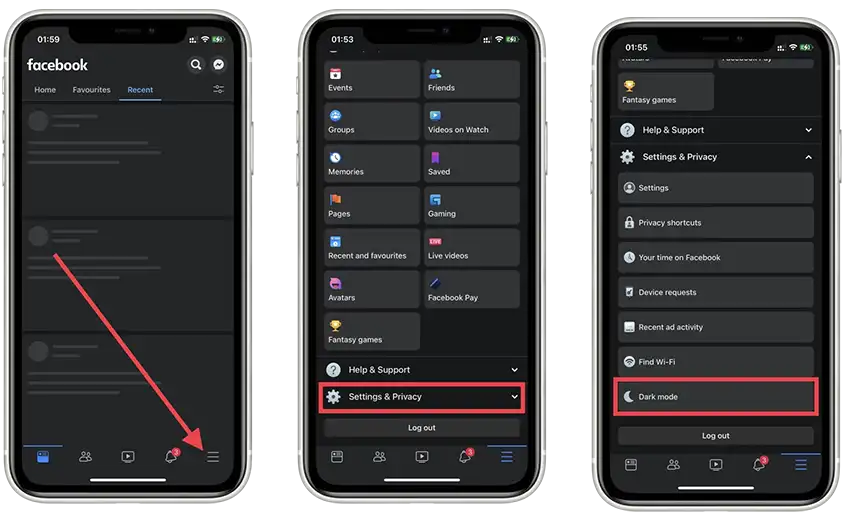
The Facebook app has its own appearance settings on iPhone.
- Open the Facebook app.
- Tap Menu.
- Open Settings & privacy.
- Tap Dark mode.
- Select On.
If Use system settings is available, you can select it instead. Facebook will then follow the light or dark appearance selected for your iPhone.
How to Enable Dark Mode on Facebook on Android
TYou can change the appearance directly in the Facebook app on an Android phone.
- Open the Facebook app.
- Tap Menu.
- Select Settings & privacy.
- Tap Dark mode.
- Select On.
If available, Use system settings allows Facebook to automatically follow the appearance setting of your Android device.
The exact menu can vary between versions of the Facebook app. On some Android tablets, the Dark mode option may also be unavailable even though it is available on other devices.
How to Enable Dark Mode in Facebook Messenger
Messenger has a separate Dark Mode setting. Changing the appearance of Facebook does not necessarily change Messenger.
To enable Dark Mode in Messenger:
- Open Messenger.
- Tap your profile picture.
- Select Dark mode.
- Choose the desired setting.
What to Do If Dark Mode Is Missing
If you cannot find Dark mode, make sure that you are using the latest version of the Facebook app or website. Facebook occasionally changes the location of settings when it updates its interface.
On a computer, check Display & accessibility first and then Settings & privacy → Settings → Preferences.
On a phone or tablet, check Settings & privacy in the Facebook app. If the option is not available, you can also try Facebook in a web browser, where the available settings may be different.