WiSA is a wireless audio technology designed for transmitting multichannel sound from a TV or another audio source to compatible wireless speakers. It was developed primarily for home theater systems.
A WiSA system replaces the audio cables between the source and the speakers with a wireless connection. The speakers themselves are usually active speakers, so they still need a power connection.
WiSA uses the 5 GHz radio spectrum, but it is not the same as conventional Wi-Fi audio. It is a dedicated wireless audio system designed to transmit multiple audio channels with precise synchronization.
How WiSA Works
A typical WiSA system consists of an audio source, a transmitter and compatible speakers.
TV → WiSA transmitter → WiSA speakers
The transmitter receives the audio signal from the TV and sends the individual audio channels wirelessly to the speakers. Each speaker receives the channel assigned to it, such as the left, right, center or surround channel.
WiSA HT supports up to eight audio channels and is designed for high-resolution multichannel audio with low latency. WiSA technology information
The wireless connection carries the audio signal. The speakers still need electrical power, so WiSA removes the audio cables but does not make the entire system completely cable-free.
WiSA Ready and WiSA Certified
WiSA Ready and WiSA Certified are different terms.
WiSA Certified products have passed WiSA certification testing for compatibility with the relevant WiSA technology. This designation is commonly used for wireless speakers and transmitters.
WiSA Ready is used for devices such as TVs and other entertainment products that can work with WiSA audio. A WiSA Ready TV may require a separate transmitter to send audio to WiSA speakers.
This distinction is important when checking a TV’s specifications. The WiSA Ready label does not necessarily mean that the TV contains a built-in WiSA transmitter.
How to Connect WiSA Speakers to a TV
The connection depends on the TV and the transmitter.
With a TV that uses an external WiSA transmitter, the setup can look like this:
TV HDMI ARC/eARC → WiSA transmitter → WiSA speakers
For example, WiSA SoundSend can receive audio from a compatible TV through HDMI ARC or eARC and transmit it wirelessly to WiSA Certified speakers. WiSA SoundSend
Some TVs and older WiSA solutions use other connections or dedicated accessories. Therefore, compatibility should be checked for the exact TV and transmitter models.
If the TV has an integrated WiSA transmitter, an external transmitter may not be required.
WiSA vs Wi-Fi and Bluetooth
WiSA uses the 5 GHz radio spectrum, but it does not operate like a normal Wi-Fi network.
With Wi-Fi audio, a device normally communicates through a home network or router. WiSA instead establishes a dedicated wireless connection between the transmitter and compatible speakers.
Bluetooth is also different. It is widely used for headphones and individual wireless speakers, while WiSA was designed for synchronized multichannel home theater audio.
The main difference is therefore the type of system each technology is intended to provide.
| Technology | Typical use | Multichannel home theater |
|---|---|---|
| WiSA | Wireless home theater speakers | Yes |
| Wi-Fi | Network audio and streaming | Depends on the system |
| Bluetooth | Headphones and wireless speakers | Not its primary purpose |
Advantages and Limitations of WiSA
The main advantage of WiSA is the ability to build a multichannel speaker system without running audio cables from an AV receiver or transmitter to every speaker.
This can make speaker placement and installation easier, particularly when rear surround speakers would otherwise require long cables.
There are also limitations. WiSA speakers still require electrical power, so the system is not completely cable-free. The wireless connection can also be affected by the radio environment, including interference in the 5 GHz band. WiSA provides separate recommendations for dealing with interference and speaker placement. WiSA support documentation
Compatibility is another consideration. A TV, transmitter and speakers must support the appropriate WiSA technology. A TV marked WiSA Ready may need an additional transmitter.
Does My TV Support WiSA?
The easiest way to check is to look at the specifications or user manual for the exact TV model.
Look specifically for terms such as:
- WiSA
- WiSA Ready
- WiSA Certified
- WiSA wireless speakers
- WiSA transmitter
- WiSA dongle
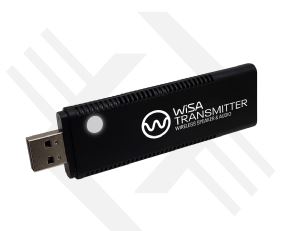
If the TV is WiSA Ready but does not have a built-in transmitter, you will need a compatible external transmitter.
You should also check which audio output the TV provides. Modern transmitters may use HDMI ARC or eARC, while some older WiSA solutions used USB accessories.