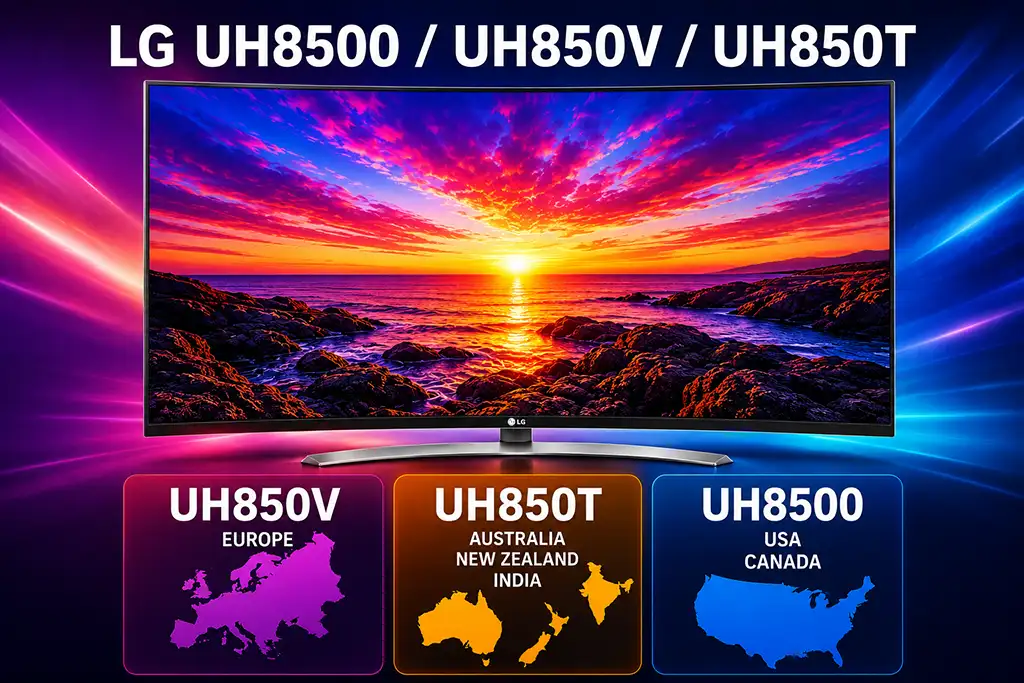
The following picture settings are recommended for the LG UH850 series of televisions released in 2016. These models share the same hardware platform, but the model number varies depending on the region:
- UH850V – Europe
- UH850T – Australia, New Zealand and India
- UH8500 – United States and Canada
The differences in the model numbers are primarily related to the television tuner installed for each regional broadcasting standard. The display panel, picture processor, and most other hardware components are the same.
These settings are intended to provide a natural and balanced image suitable for movies, TV programs, and everyday viewing. Individual preferences and room lighting may require slight adjustments.
Picture Settings
| Setting | Value |
|---|---|
| Picture Mode | Standard |
| Aspect Ratio | 16:9 |
| Energy Saving | Off |
| Backlight | 70 |
| Contrast | 85 |
| Brightness | 50 |
| Horizontal Sharpness | 0 |
| Vertical Sharpness | 0 |
| Color | 51 |
| Tint | 0 |
Picture Options
| Setting | Value |
|---|---|
| Noise Reduction | Off |
| MPEG Noise Reduction | Off |
| Black Level | Low |
| LED Local Dimming | Off |
| TruMotion | Off |
Expert Controls
| Setting | Value |
|---|---|
| Dynamic Contrast | Off |
| Super Resolution | Off |
| Color Gamut | Normal |
| Edge Enhancer | Off |
| Color Filter | Off |
| Gamma | 2.2 |
| Color Temperature | Warm2 |
White Balance
Method: 2 Point
Pattern: Outer
Point: Low
| IRE | Red | Green | Blue |
|---|---|---|---|
| 5 | -16 | -17 | -18 |
| 10 | -16 | -18 | -18 |
| 15 | -12 | -13 | -12 |
| 20 | -9 | -9 | -9 |
| 25 | -10 | -10 | -9 |
| 30 | -12 | -12 | -10 |
| 35 | -12 | -11 | 1 |
| 40 | -13 | -9 | -5 |
| 45 | -12 | -7 | -2 |
| 50 | -10 | -5 | 2 |
| 55 | -8 | -4 | 3 |
| 60 | -7 | -3 | 6 |
| 65 | -6 | -3 | 8 |
| 70 | -6 | -3 | 10 |
| 75 | -6 | -4 | -6 |
| 80 | -7 | -4 | -3 |
| 85 | -4 | -5 | -3 |
| 90 | 0 | -6 | -3 |
| 95 | 0 | 7 | -2 |
| 100 | 15 | 7 | -2 |
Picture Settings Explained
Picture Mode
The Standard picture mode provides a well-balanced image with accurate colors and moderate brightness. It is suitable for most TV programs and everyday viewing.
Backlight
Adjusts the intensity of the LED backlight. This setting controls the overall brightness of the screen without affecting black levels. In a dark room, lowering the backlight can improve viewing comfort and reduce eye strain, while a brighter room may require a higher value.
Contrast
Controls the brightness of the brightest parts of the image. Increasing contrast makes whites appear brighter, but setting it too high may cause loss of detail in very bright scenes.
Brightness
Adjusts the black level of the picture. A correct setting allows dark scenes to retain detail without making blacks appear gray.
Horizontal and Vertical Sharpness
Sharpness artificially enhances object edges. A value of 0 preserves the original image without introducing halos or unwanted edge enhancement.
Color
Controls the overall color saturation. Higher values make colors more vivid, while lower values produce a softer and more natural image.
Tint
Adjusts the balance between green and magenta tones. Normally this setting should remain at 0 unless color correction is required.
Picture Options Explained
Noise Reduction
Reduces random image noise found in low-quality broadcasts or highly compressed video. For high-quality HD and UHD content, it is recommended to leave this option disabled.
MPEG Noise Reduction
Reduces compression artifacts such as blockiness or mosquito noise commonly seen in heavily compressed video streams.
Black Level
Determines how the television displays dark areas. The Low setting is recommended for most HDMI devices using the standard video signal range.
LED Local Dimming
Controls the brightness of different backlight zones to improve contrast. Some viewers prefer turning it off because it produces a more consistent image with less brightness fluctuation.
TruMotion
LG’s motion interpolation technology inserts additional frames to make movement appear smoother. While useful for sports, many users disable it for movies to preserve the original cinematic appearance and avoid the “soap opera effect.”
Expert Controls Explained
Dynamic Contrast
Automatically adjusts contrast depending on the scene. Disabling it provides a more accurate and consistent image.
Super Resolution
Applies digital sharpening to lower-resolution content. Native Full HD and Ultra HD sources generally look more natural with this feature turned off.
Color Gamut
Defines the range of colors the television displays. The Normal setting offers the most accurate color reproduction for standard video content.
Edge Enhancer
Artificially increases edge definition. Disabling it avoids unwanted outlines around objects.
Color Filter
Used primarily for calibration and testing. It should remain disabled during normal viewing.
Gamma
Controls the relationship between brightness and shadow detail. A gamma value of 2.2 provides balanced contrast and is appropriate for most home viewing environments.
Color Temperature
The Warm2 setting produces the most natural white balance and closely matches the industry standard used for professional video mastering.
White Balance
The white balance adjustments shown above fine-tune the red, green, and blue levels across different brightness ranges (IRE levels). These calibration values help achieve neutral whites and more accurate colors. Since panel characteristics vary slightly between individual televisions, these settings should be considered an excellent starting point rather than absolute values.