

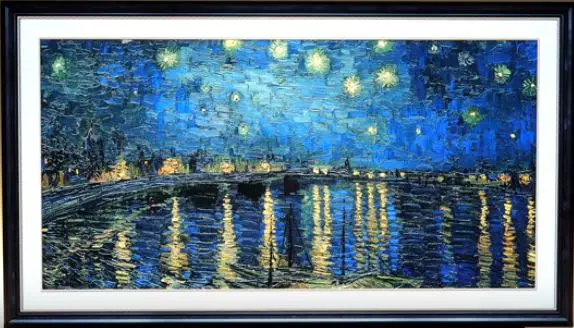
Gallery Mode LG Smart TV mode
On LG TVs, the gallery mode has appeared in the last few years. This mode is available on LG TVs. Why this mode and how it works. Yes, we note that LG is not the first to come up with such an opportunity, Samsung even released a line of TVs designed to display photos or pictures.
Of course, if we consider such an opportunity, then all TVs have the ability to display images in gallery mode, but in Gallery mode from LG, there are some peculiarities.
How does Gallery Mode LG TV work?
LG has created an image library that is stored on LG’s servers. It is enough for the user to activate Gallery Mode on the TV. Screen settings are also available. In televisions with voice control, you can not only enable gallery mode, but you can also choose the type of displayed pictures. For example, you can give a command to show mountains, sea or jungle. For a more colorful demonstration, images are inserted into a virtual frame.
Yes, of course, something similar was before, only it was necessary to demonstrate photos from a computer or from a flash drive.


do u have an under water screensaver, with swimming fish, as opposed 2 this african landscape?
You realize in 1320 somebody was saying “this is 1320 not 1307.” In 1720 somebody was saying “this is 1720 after all not 1707.” 🙂
Yes you can stop the “burn in “ by purchasing a Samsung QLED !
I 2nd this… Crazy there isnt a basic App LG can put out for the Gallery mode???? These Tv’s are driving me crazy…. No HBOMAX, NO ESPN.. NO
geez this is 2020 not 2007 , can we please get the “burn in” problem fixed before we head to mars??
Is there a place I go to to download some of these picture frames to put on a USB I have an LGTV nano 2019 which sadly has not got this on it
You can record your own photos on a flash drive and watch through the USB port of the TV. No photos can be added to Gallery Mode LG.
How do add you own person images to gallery mode
If you have an OLED TV, in order not to get a screen burn, LG removed the ability to display a static image.
does anyone know how to set one picture to display on the tv …. the gallery mode seems to be set on a carousel showing pictures on a loop which is whilst may be useful in some circumstancing is not in all. Any thoughts on this?
Martin