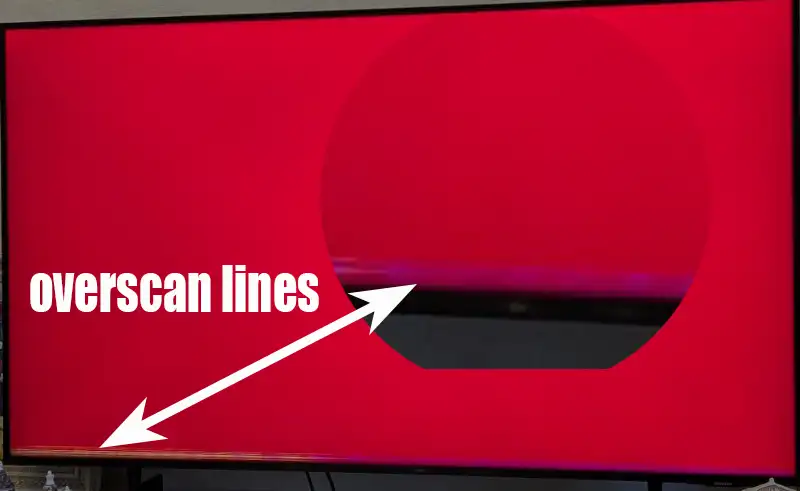
Sometimes a thin green, yellow, or black line may appear along the edge of the TV screen. This phenomenon is called an overscan line. It usually occurs when the TV is set to display modes such as “Screen Fit” or “Just Scan” , which are designed to display the entire image without cropping. In other words, the image should fill the TV screen as much as possible.
In these modes, all available pixels are displayed, but if the incoming video signal does not contain complete image data at the edges, a colored line may appear in the areas where information is missing. This depends on the transmission equipment used by television stations.
Main causes of overscan lines
The most common cause is incomplete image data, which often occurs when recording content from television broadcasts, especially older analog ones. In analog television broadcasts, it was common practice not to fill the entire frame with information; this was due to the lack of clear equipment standards, and TV manufacturers worked around these limitations by slightly expanding the image on the screen. Another possible cause is a malfunction of the T-Con board, which controls the display of pixels on the screen. If it malfunctions, uneven colored stripes may appear on the screen.
How to eliminate or minimize the overscan line
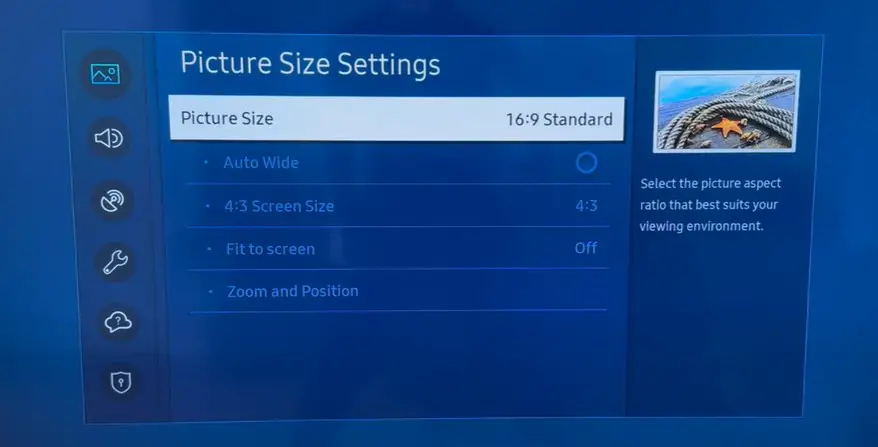
The simplest solution is to change the TV’s aspect ratio to 16:9. This slightly enlarges the image, cropping the outer edges and hiding the overscan line.Although this may crop a small portion of the image, especially when using a laptop connected via HDMI, it usually does not affect normal TV viewing.If the line remains visible on all inputs, this may indicate a malfunction of the T-Con board, which may require repair or, more commonly, replacement.
Overscan lines are not a serious problem and do not damage the TV, but they can be distracting when watching videos.