

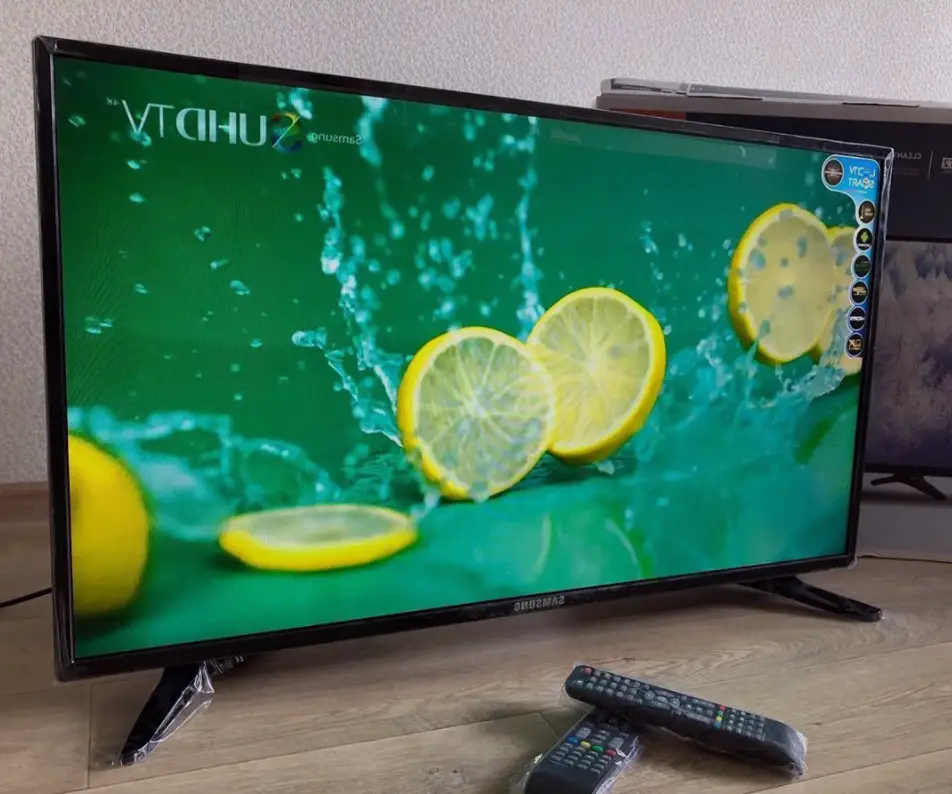
Samsung smart tv secret menu bluetooth
That’s not a secret that Samsung Smart TVs have not only a service menu but also a hidden one, made mainly for service centers. Some people call this menu a Samsung TV secret or hidden menu and it offers much broader functions than the common one. A lot of people are interested in getting access to the Samsung TV secret service menu, as it gives additional functions to set up your TV. One of them is turning on Bluetooth in your Samsung Smart TV.
Let’s first answer the question: Why do you need Bluetooth in your Samsung TV at all? Firstly, Bluetooth can be used to connect headphones and other audio devices. Secondly, Bluetooth can be used to connect a Smart remote to your Samsung TV and, therefore, make it more convenient to use. By the way, we don’t recommend using Bluetooth devices instead of wired ones, as there may be some lags with your Bluetooth audio, including sync lags when the lips on the screen are unsynced with the audio flaw. But you can still use a secret menu to activate Bluetooth and connect One Remote to your TV and it really worths a shot.
Does My Samsung TV Support Smart Remote?
According to Samsung, all TVs that don’t have a Smart remote attached ‘in the box’ don’t support One Remote, which means that even if you buy one separately, it wouldn’t work with your Samsung TV. Actually, that’s not entirely true. Depending on the country the TV is made for, the same model may either support or doesn’t support the Smart remote.
It sounds a little bit weird, but that’s how it works. We will explain why the company is acting so in a little more detail. Samsung uses Smart remote control support as one of the marketing tricks to divide TVs into classes and, accordingly, for their correct price positioning. That’s why for some TV models Samsung turns off access to using Bluetooth on a software level. The good news is that you can still use the smart remote in this case, you just need to get the Bluetooth turned on using the secret menu.
In case you aren’t sure if your TV supports the smart remote you can check it yourself. If there is Bluetooth in your TV’s tech spec, then the Smart remote control is disabled at the software lever. In order to use Samsung smart remote, you will need to enable it in the secret menu (see below for details).
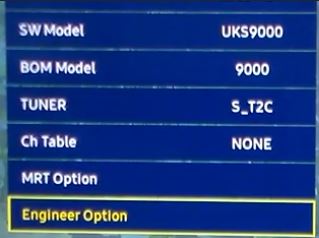
Also, you can check if your TV supports Bluetooth on the hidden menu first screen.

How To Enable Smart Remote Support in Samsung TV Secret Menu
Note: Depending on the specific TV model, the secret menu appearance may differs.
As mentioned above, for TVs that have Bluetooth, you can enable smart remote support manually using the secret menu. In order to turn on One Remote support, you need to do the following:
- Enter the secret (hidden) menu. You can read how to do enter the secret menu in our article. Note, that depending on your TV model, the service menu may differ. Currently, there are six different algorithms for entering the service menu for different TV models.
- Next, go to Option → Engineer Option → BT_Audio_ON_OFF and select ON. This setting enables audio transmission via Bluetooth;
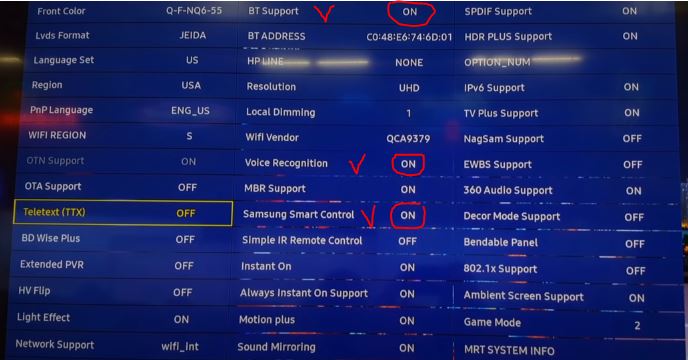
- The next step is as follows: Option → MRT Option → BT Support ON → Voice Recognition ON → Samsung Smart Control ON;
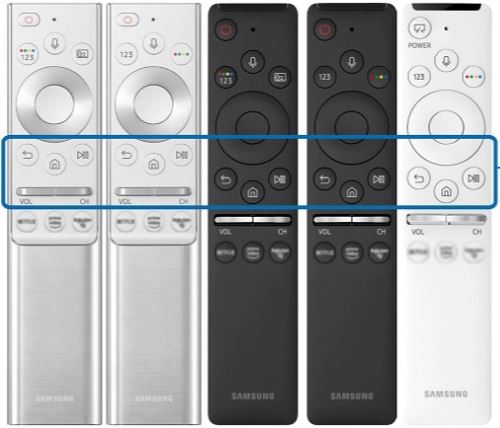
- Then you would get access to the Bluetooth settings, so you can pair your smart remote with the TV. Usually, it’s automated, but if they don’t get paired, then you need to press the RETURN and PLAY/STOP buttons on your control simultaneously (as shown in the picture below).
If your TV doesn’t have a Bluetooth module, you won’t be able to connect to the Smart remote. This means that your TV is of the low-end segment, series 8 or below (for more information on TV model numbers and series, read this article).
Please note! The secret service menu is designed for service masters, so if you change any important settings such as screen type or display resolution, or any other important settings, you can simply break your TV.
Let’s briefly explain why things can go such a way. You need to understand that all changed settings are recorded to the non-volatile memory chip, so when you’re turning your TV on, all apps and settings are loaded from there. In case you’ve recorded incorrect info, the TV wouldn’t be able to start. If this happens, the only way to fix the TV is to reprogram it with the correct settings. To do this, you would need to unsolder the chip, write the correct settings with the programmer, and then resolder it on the board. In case you’ve faced such an issue, the best way to solve it is to contact the service center.
To prevent such failure, we strongly recommend you to take a picture of the Samsung TV secret menu factory settings with your phone. That way, you would always know what EXACTLY you’ve changed, so you would be able to restore the initial settings yourself. Also, If you decide to leave the page or turn off the TV, we recommend re-check the settings to make sure you haven’t made any accidental changes.
So, as you can see, accessing the Samsung TV’s secret menu can be useful in some cases, for example for activating Bluetooth. But you must be extremely careful not to make a mistake and break your TV. In case you don’t know what a certain setting does, it’s always better not to change it at all, this will significantly reduce the chances of doing something wrong.
Also, if you have questions – don’t hesitate to ask me in a discussion below, I’m always trying to answer questions ASAP. And if you were looking for any other features of the Samsung TV secret menu – write about them as well, I would answer and, maybe, would write another article covering them.


Hello! I have a Samsung TV type UE65AU7022KXXH. I can’t pair Bluetooth with a Samsung HW-F355 Air Track. The TV sees a different Bluetooth speaker. I can also pair the HW-F355 with another device. Do you have any idea why it doesn’t work?
ue50au7090 – This is a budget TV, I assume Samsung has greatly reduced the service menu to limit some features. As for the settings you mentioned, I’ve encountered feedback that they are not modifiable. You probably can’t connect the Smart remote to the TV.
Hi, I have a series 7 , precisely ue50au7090, with bluetooth module and bluetooth capabilities. I can’t pair a bluetooth remote to use the smart remote control. As someone else pointed out, i have few options in the secret menu, and the bluetooth options that are off are in the debug mode. BT DUT: OFF, BT THROUPUT: FAILURE, VOICE DEBUG :OFF, BT NN DISCOVERABLE: OFF. Should I turn any of these settings to enable the smart remote control? Thanx in advance
Hello, your TV supports Bluetooth headphones. I would recommend trying to connect other headphones to the TV. You don’t need to change anything in the service menu.
Also, try unplugging the TV for a couple of minutes and then plug in the headphones. During the pairing, the headphones should be near the TV.
I have a Samsung Frame OE49LS03RAUXXU, it finds my headphones under Bluetooth Speaker List but does not pair. I’ve tried using the MRT Option and everything is set to “on”.
Only thing that seems off is that I see under Debug > Bluetooth Throughput: FAILURE. Not sure if it’s related.
Is there anything I can do to pair my headphones?
I have a Samsung Frame, it finds my headphones under Bluetooth Speaker List but does not pair. I’ve tried using the MRT Option and everything is set to “on”.
Only thing that seems off is that I see under Debug > Bluetooth Throughput: FAILURE. Not sure if it’s related.
Is there anything I can do to pair my headphones?
Your TV does not have a Bluetooth module. Therefore, the Address stays on Not supported.
For: UE55NU7090S, In MRT options I turn on BT support, but BT Address stays on Not supported.
In the sound menu the BT speaker option appears, but it doesn’t find my headphone
The UA55NU7300 has no bluetooth module. Therefore, you cannot connect the Smart remote control. The operating system is universal, so there are Smart remote control settings. You cannot connect the Smart remote control to the TV.
My tv UA55NU7300 I cannot connect the smart control to the TV. While the inside of the TV is all the smart control guides. Please explain to me . Thanks