Intel has used several processor families and naming systems over the years. This can make it difficult to determine the generation of a CPU simply by looking at its name.
The easiest way to understand an Intel processor is to identify four things: the processor family, performance level, generation or series, and model number. The letters at the end of the model provide additional information about the processor.
Intel Processor families
Intel’s main processor families include Core, Core Ultra, Xeon, Pentium, and Atom.
Core was Intel’s main consumer processor family for desktop and laptop computers. The traditional lineup included Core i3, i5, i7, and i9 processors.
Core Ultra is Intel’s newer consumer family, introduced in 2023. It uses a separate naming system and adds features such as dedicated NPU hardware for AI workloads on supported models.
Xeon processors are designed mainly for servers and professional workstations.
Pentium and Atom were used primarily for entry-level and low-power systems. Their numbering systems are different from those used by traditional Core processors.
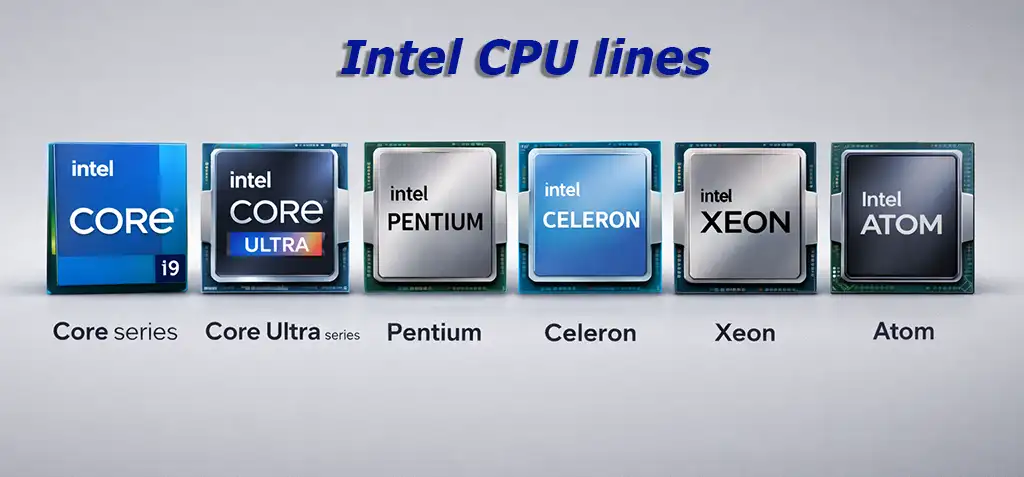
Intel CPU lines
Intel processor lines refer to different families of processors developed by Intel for specific types of devices and workloads. Each line is targeted at a specific market segment.
The Core series is Intel’s main line of processors for the consumer market, including Core i3, i5, i7, and i9 processors. They are used in most laptops and desktop PCs, with higher numbers indicating more cores, cache memory, and performance features.
The Core Ultra series is a new generation of consumer chips focused on efficiency, integrated artificial intelligence acceleration, and enhanced graphics, which are mainly used in modern laptops.
Pentium and Celeron are entry-level processors designed for basic tasks such as web browsing and office work.
Xeon processors are designed for servers, data centers, and professional workstations. They support large amounts of memory, multi-socket configurations, and the reliability features required for enterprise workloads.
Atom processors are ultra-low-power chips originally designed for netbooks and embedded systems, and are now mainly used in IoT devices, network equipment, and industrial equipment.
Intel Core i3, i5, i7 and i9 Mean
The i3, i5, i7, and i9 designations indicate the processor’s position within the traditional Core lineup.
Core i3 is the entry-level category for everyday computing.
Core i5 is the mainstream category, offering a balance of performance and price.
Core i7 is positioned higher and is intended for more demanding workloads.
Core i9 represents the high-end segment and is designed for demanding gaming, content creation, and professional applications.
These designations are most useful when comparing processors from the same or similar generations. A newer Core i5 can be faster than an older Core i7 because Intel changes the architecture, core configuration, frequencies, cache, and other characteristics between generations. The exact specifications of each Core i3, i5, i7, or i9 processor therefore depend on its generation and model.
How to Identify an Intel Core generation
For traditional Intel Core processors, the generation is normally identified by the number immediately after i3, i5, i7, or i9.
For example:
- Core i5-8400 — 8th generation
- Core i7-9700K — 9th generation
- Core i5-10400 — 10th generation
- Core i7-11700K — 11th generation
- Core i5-12400 — 12th generation
- Core i7-13700K — 13th generation
- Core i9-14900K — 14th generation
For 1st-generation Core processors, the model number uses three digits, such as Core i7-870. Starting with 2nd-generation Core processors, the first digit of the four-digit model number generally identifies the generation.
For 10th-generation and newer mainstream Core processors, the first two digits of the model number generally identify the generation. For example, 10 in Core i5-10400 identifies the 10th generation, while 13 in Core i7-13700K identifies the 13th generation.
The traditional Core generation system runs from 1st generation through 14th generation. Intel then introduced a new naming system with Core Ultra instead of continuing with a 15th-generation Core designation.
Intel Core generations and Core Ultra series
The traditional Core generations and the newer Core Ultra series should be treated as separate naming systems.
| Intel processor family | Generation or series | Example | Release year |
|---|---|---|---|
| Core | 1st Gen | Core i7-870 | 2008 |
| Core | 2nd Gen | Core i7-2600 | 2011 |
| Core | 3rd Gen | Core i7-3770 | 2012 |
| Core | 4th Gen | Core i7-4770 | 2013 |
| Core | 5th Gen | Core i7-5775C | 2015 |
| Core | 6th Gen | Core i7-6700K | 2015 |
| Core | 7th Gen | Core i7-7700K | 2017 |
| Core | 8th Gen | Core i7-8700K | 2017 |
| Core | 9th Gen | Core i9-9900K | 2018 |
| Core | 10th Gen | Core i9-10900K | 2020 |
| Core | 11th Gen | Core i9-11900K | 2021 |
| Core | 12th Gen | Core i9-12900K | 2021 |
| Core | 13th Gen | Core i9-13900K | 2022 |
| Core | 14th Gen | Core i9-14900K | 2023 |
| Core Ultra | Series 1 | Core Ultra 7 155H | 2023 |
| Core Ultra | Series 2 | Core Ultra 9 285K | 2024 |
| Core Ultra | Series 3 | Core Ultra X7 368H | 2026 |
The 1st through 14th generations belong to the traditional Core naming system. Core Ultra Series 1, Series 2, and Series 3 use a separate naming system and should not be called the 15th, 16th, or 17th generations of Core processors.
Intel Xeon, Pentium and Atom model numbers
Intel uses different naming systems for Xeon, Pentium, and Atom processors, so there is no single rule for identifying their generations.
Xeon is Intel’s processor family for servers and professional workstations. Older Xeon processors used names such as E3, E5, and E7, where the designation identified the product family and market segment. For example, Xeon E5-2690 v4 indicates the E5 product family, model 2690, and the fourth-generation version of that processor. Intel later introduced Xeon Scalable, which uses explicit generation numbers such as 1st Gen, 2nd Gen, 3rd Gen, and so on. The newer Xeon 6 family uses a different naming system.
Pentium is more complicated because Intel used the brand for several different processor families, including Pentium D, Pentium G, Pentium Silver, and Pentium Gold. Model numbers such as 1000, 2000, 3000, 4000, and 6800 also refer to different model series rather than consecutive generations. Therefore, the number alone is not enough to determine the generation of a Pentium processor.
Atom was developed as a family of low-power processors for compact devices. Intel released Atom processors in series such as Z, N, E, C, X, and P, targeting different devices and workloads. For example, Atom Z and Atom x7 belong to different product families and periods, so their numbers cannot be compared as simple generation numbers.
For Xeon, Pentium, and Atom, the most reliable way to identify a processor is to look at its complete family name and model number. Unlike traditional Core i3, i5, i7, and i9 processors, the numbers in these families do not by themselves indicate a straightforward processor generation.
| Processor family | Approximate period |
|---|---|
| Pentium Classic | 1993–2006 |
| Pentium D | 2005–2008 |
| Pentium G | 2010–2022 |
| Pentium J | 2013–2021 |
| Pentium N | 2013–2021 |
| Pentium Silver | 2017–early 2020s |
| Pentium Gold | 2017–2025* |
| Atom Z | 2008–2017 |
| Atom N | 2008–2015 |
| Atom E | 2013–2014 |
| Atom C | 2013–2022 |
| Atom X | 2015–2025 |
| Atom x7000 series | 2023–present |
| Xeon E3 | 2011–2017 |
| Xeon E5 | 2012–2016 |
| Xeon E7 | 2011–2016 |
| Xeon D | 2015–present |
| Xeon Scalable | 2017–2023 |
| Xeon 6 | 2024–present |
*Pentium Gold remained in Intel’s product documentation into 2025, but Intel no longer introduces new Pentium generations.