

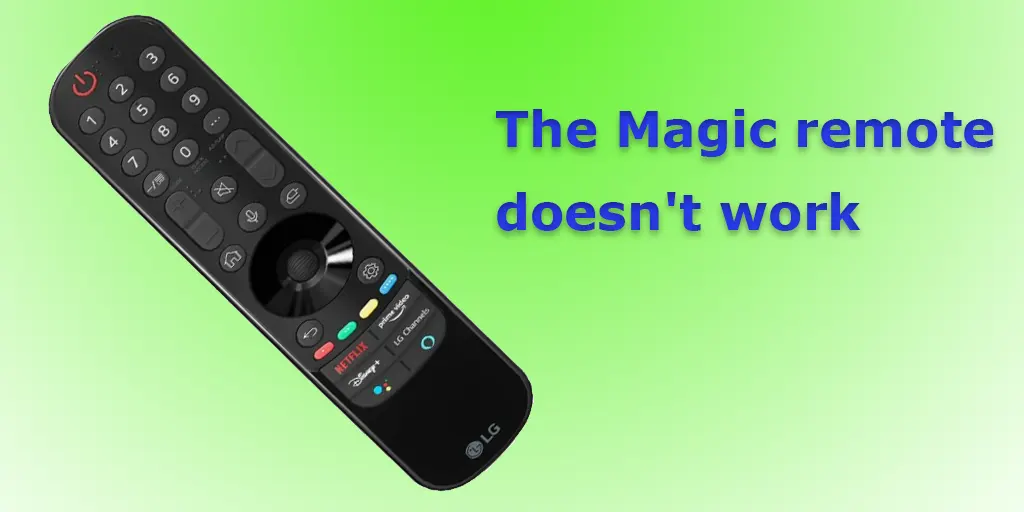
This article will look at some of the most common problems encountered when using the Magic (Smart) remote control, an accessory that comes with almost all modern LG televisions. This remote works via Bluetooth and has a central wheel that resembles a computer mouse. Users may find themselves in a situation where the remote control no longer works; it only turns the TV on and off. The red LED indicator built into the power button flashes when the buttons are pressed, but the TV does not respond. In addition, the article will discuss common problems associated with the LG universal remote control, thus broadening the scope of the study and providing a complete understanding of the difficulties associated with remote control.
How the Magic Remote Works
For the Magic Remote to work via Bluetooth technology, it must be paired with your LG TV. This step is essential because Bluetooth devices must be paired for effective communication. The Magic Remote is usually included with a new LG TV, and the initial setup is straightforward. Turning on the TV and pressing the OK button (the center wheel of the remote) starts the automatic pairing process, linking the remote to the specific TV.
The critical aspect is that the Bluetooth modules of the TV and the remote work together. When the TV is off, the Magic Remote uses infrared signals to control the TV. The user must point the remote directly at the TV and press the power button to initiate the TV’s startup. This action activates the TV’s operating system, which activates the Bluetooth module when it boots up. As a result, the TV automatically detects and reconnects to the Magic Remote, putting it in Bluetooth communication mode. The TV can then be controlled via Bluetooth.
Problems with LG Magic remote
The Magic remote control is a rather complex device consisting of three main elements:
- Infrared module (controls the TV using infrared signals)
- Bluetooth module (transmits signals to control the TV, voice control)
- Gyroscope (orienting the remote in space to move the pointer on the screen).
All of these elements work together to make the remote work. Many situations and problems can occur with the remote, but here are the most common ones.
- The remote doesn’t work: On the Magic remote, the Power button lights up when any button is pressed, which means the remote is responding to a command. If the Power button doesn’t light up when you press any button, then the remote doesn’t work.
- The remote only turns the TV on and off: This means that only the infrared module in the remote is working, and Bluetooth is not working. In this case, you must turn off the TV by pulling the plug out of the socket for 1-2 minutes. This is necessary for the TV to reset the RAM cache.
- The remote control’s Power button power indicator is constantly lit: If the power button on the remote control is constantly lit, one or more buttons are constantly pressed. Check to see if all the buttons are level; one of them may have been pressed. Water or other liquid may have gotten into the remote control. If you find a pressed button, repair it. If the remote has been dropped or water has gotten into it, you must repair it.
- Magic remote does not work after replacing the batteries: If the remote does not work after replacing the batteries, check that the batteries are installed correctly. After the batteries are installed, the power button should blink three times. If it blinks but the remote does not work, the problem is with Bluetooth. Re-initializing the Bluetooth pairing will help you.
- Remote control does not work intermittently: If you experience reduced functionality or loss of communication between your TV and remote control, the culprit is often a low battery. A dead battery causes the power supply voltage to drop, which in turn weakens the strength of the Bluetooth signal. As a result, the range of the remote control is greatly reduced and the reliability of communication with the TV becomes unstable. To solve this problem, replace the batteries.
- Bluetooth service must be initialized. LG TV: This message appears on the screen when the TV cannot detect the Bluetooth module. The Bluetooth module is not working or faulty, and you need to repair the TV.
- LG TV Home button not working: The Home button is often used to bring up menus on your TV. If the Home button does not work, you need to disassemble and repair the remote.
Magic LG remote control reset and pairing (2011-2023)
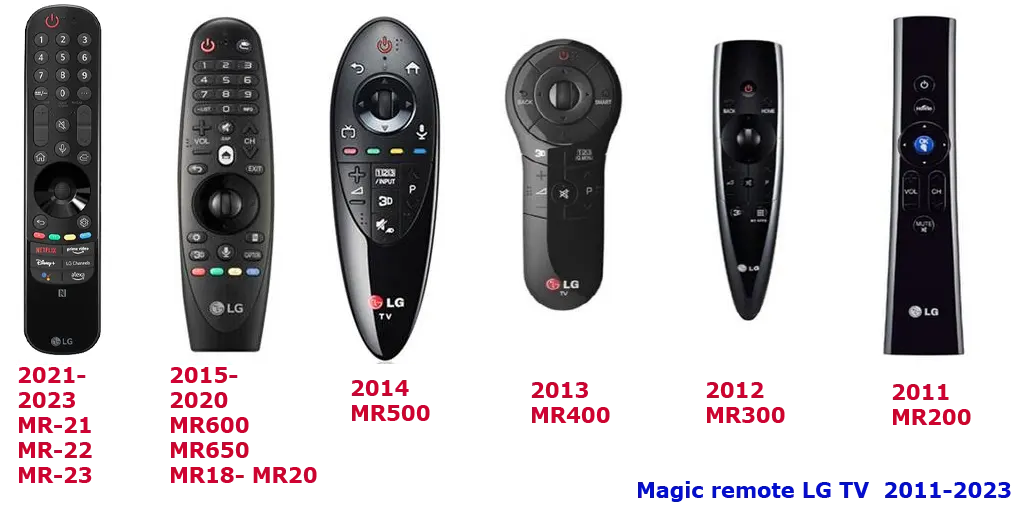
Since their introduction, LG Smart TVs have been accompanied by a series of evolving remote controls with notable design changes. A significant development occurred in 2021 when the Magic Remote underwent a redesign. In addition to aesthetic updates, some models of these remotes were equipped with NFC (Near Field Communication) modules, allowing for quick interaction with mobile devices via an NFC tag. In the picture, you can see which Magic remotes exist.
The Magic Remote communicates with your TV via Bluetooth. The TV and remote remain paired even when the TV is turned off. However, problems can occur if there are glitches in the software or Bluetooth protocol. In such cases, the remote is connected to the TV but does not function. This scenario can be compared to Bluetooth headphones that, despite being paired with a phone, do not transmit sound until reconnected. To fix such problems, you need to repair, and here’s how to do it.
Connecting a new or reset LG Magic Remote to the TV
Connect a new LG Magic Remote to your TV (2012-2023): To pair the new remote with your TV, turn on the TV, insert the batteries into the remote, point the remote at the TV, turn on the TV by pressing the power button on the remote, wait for the TV to turn on, and press the OK button (this is the mouse wheel on the remote). A message on the TV screen indicates that the remote control and the TV are paired.
If the TV has already worked with the remote control, the old pairing will be deleted, and the TV will create a new pairing.
Pairing a new LG Magic Remote with your TV (2011): Magic remote for 2010-2011 TVs This is one of the first remote controls for smart TVs. LV and LK series. To pair the remote control for the first time, place it at arm’s length from the TV (optional, but recommended), and press and hold the OK or MUTE button for about 5 seconds. Wait for a message on the TV screen indicating that pairing is complete. During pairing, the backlight of the remote control’s power button will blink to indicate that the pairing process is initializing.
Resetting LG Magic remote control pairing
To re-pair the remote control with the TV, you must reset the previous setting, after which the remote control will be the same as when you purchased it and can be paired with the TV again.
Note that the reset procedure differs for TVs manufactured before 2021 and after 2021.
Turn off the TV to prevent the remote control from automatically pairing during the reset.
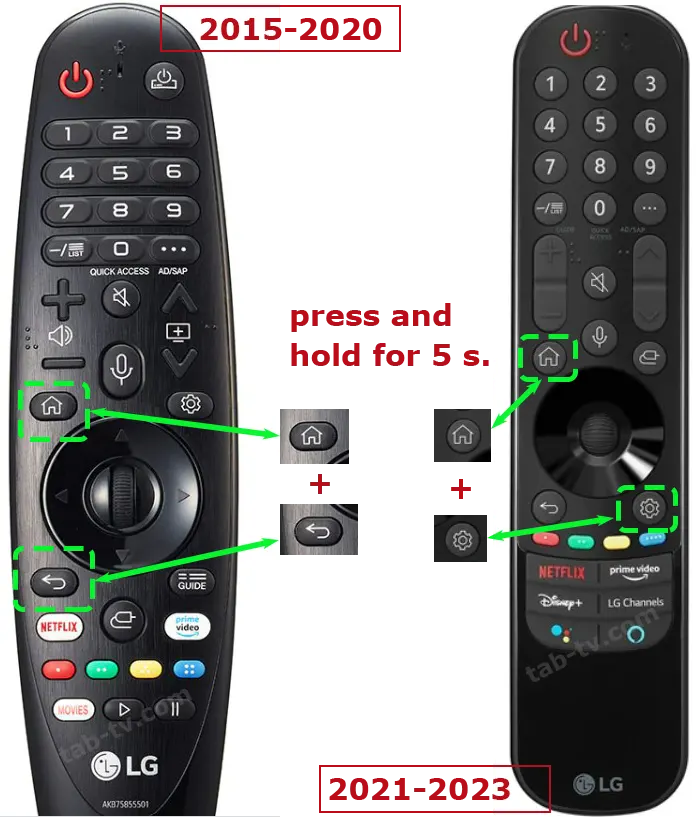
- TVs manufactured before 2021: To reset the remote control, press the BACK and HOME buttons simultaneously. Keep the buttons pressed for at least 5 seconds. The remote control will reset and become as good as new.
- LG TVs after 2021, MR21-MR23 remotes: For these remotes, simultaneously press and hold the Home and Settings buttons for at least 5 seconds. Then, the Power button will blink three times, and the remote will delete the previous pairing.
Reconnecting the Magic Remote to Your LG TV
LG’s Magic Remotes, models from 2015 onwards, feature an auto-reset and reconnect function. This feature is especially useful for ensuring that your remote maintains a normal pairing with your TV. For TVs predating 2015, the process requires a manual reset and reconnection.
For 2015-2020 Models (MR600, MR650, MR18, MR19, MR20):
To initiate the automatic reconnection, press and Home the GUIDE button on your Magic Remote for five seconds. This action will cause the remote to disconnect from the TV, effectively resetting the pairing. Subsequently, it will automatically re-establish the connection with the TV.
For Models from 2021 (MR21, MR22, MR23):
The process involves simultaneously holding down the HOME and SETTINGS buttons on the remote. Observe as the power button blinks thrice, indicating the reset of the remote control’s settings. Continue holding the buttons until the power button emits a steady light, signaling the successful reconnection to the TV. A confirmation message of the remote control pairing should also appear on your TV screen.
Tips for pairing your Magic remote
Here are some requirements for pairing your remote with your TV. These simple rules will help you avoid problems setting up your remote and TV.
- The TV must be turned on: If other LG TVs are nearby, turn on only the one you want to pair with and turn off the others. The remote supports only one Bluetooth connection
- Pairing starts 20-30 seconds after the TV is turned on, as the TV needs time to start its operating system.
- For successful pairing, all settings on the remote must be made close to the TV, and there must be a high Bluetooth signal strength between the remote and the TV. This helps prevent accidental pairing with another TV. The remote will pair with the TV that detects the highest Bluetooth signal strength.
- If you need to know which remote control to use with your LG TV, read our article “LG Remote Control Compatibility List. “
Testing Your Magic Remote Using a Smartphone
To ascertain the functionality of your Magic Remote, particularly for models from 2016 to 2023 (MR650, MR18, MR19, MR20, MR21, MR22, and MR23), you can utilize your smartphone’s Bluetooth feature. This method leverages the universality of the Bluetooth protocol in these remotes. Follow these steps to test your remote:
- Turn Off Your TV: Begin by ensuring your TV is turned off to avoid any interference during the testing process.
- Reset Magic remote control:
- For MR21 through MR23 models: Press and hold both the HOME and SETTINGS buttons for 5 seconds.
- For MR650, MR18 through MR20 models: Press and hold the BACK and HOME buttons for 5 seconds.
- Activate Bluetooth on Your Smartphone: Navigate to the Bluetooth settings on your smartphone and initiate a search for new Bluetooth devices.
- Enter Pairing Mode on the Remote: Press the wheel (center button) on your Magic Remote. This action puts the remote into pairing mode.
- Check Your Smartphone’s Device List: Observe the list of available Bluetooth devices on your smartphone. Look for a device name starting with “LGE MR**,” which represents the Magic Remote.
- Evaluate the Results:
- If you see the Magic Remote listed among the available devices on your smartphone, it indicates that the remote is likely functioning properly.
- After confirming the remote’s visibility in your smartphone’s Bluetooth search, proceed to reconnect the remote to your TV.
LG universal remote control does not work
If you’re experiencing issues with your LG TV’s standard remote control, the following troubleshooting steps can help diagnose and resolve the problem:
- Verify Remote Control Functionality:
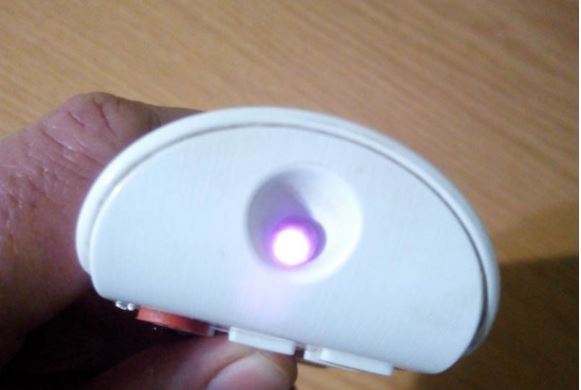
- Use your smartphone camera to check the remote. Activate the camera and point it towards the remote control’s infrared LED, typically located on the front end.
- Press any button on the remote. If functioning, the LED should blink. Note that while infrared light is invisible to the naked eye, smartphone cameras can detect it.
- Assessing the Remote’s LED Activity:
- If the LED Blinks: This indicates the remote is operational, but the TV is not receiving its signal. Check for any obstructions (like a soundbar) that could be blocking the signal path between the remote and the TV.
- If the LED Does Not Blink: This suggests an issue with the remote itself. Proceed to the next step.
- Remote Control Troubleshooting:
- Replace Batteries: If the LED doesn’t blink, first try replacing the remote’s batteries with new ones.
- Purchase a New Remote: If replacing batteries doesn’t rectify the issue, it may be necessary to acquire a new remote.
- TV Software Reset:
- If the remote’s LED blinks but the TV does not respond, consider a software issue within the TV. Unplug the TV from the wall outlet for 1-2 minutes. This action effectively restarts the TV’s internal systems.
- After the waiting period, plug the TV back in and test the remote. If the remote now works, the issue was likely a temporary software glitch in the TV.
- Further Action:
- If the TV Responds: The problem is resolved. Continue to monitor for any recurrent issues.
- If the TV Still Does Not Respond: The TV may require professional repair, especially if it consistently fails to respond to the remote control.
Addressing Non-Functional Buttons on LG TV Remote Control
When specific buttons on your LG TV remote control, mainly frequently used buttons such as volume and channel selection, stop responding, it is often due to dirt buildup on the contact pads on the circuit board. To remedy the situation, it is recommended to clean these areas thoroughly. Here’s a step-by-step guide to restore functionality:
- Disassemble the remote control: Carefully open the remote control. Usually, this involves removing the battery compartment cover, removing the batteries, and removing all the screws holding the back panel in place. If the remote control does not have screws, in which case the remote control has latches on the sides of the case, you will need to separate the two halves of the remote control carefully.
- Find the board with contact pads: Clean the contact pads.
- Use an alcohol-based cleaner such as isopropyl alcohol to clean. Apply a small amount to a cotton swab or soft cloth.
- Gently clean the contact pads on the PCB. Make sure all dirt is removed.
- Reassemble the remote control: After the alcohol has dried and all areas are clean, reassemble the remote by carefully aligning and connecting the two halves. Replace the screws, batteries, and battery cover.
- Test the remote control: After reassembly, check to see if the previously not working buttons respond.
In most cases (about 90%), this cleaning process will restore functionality to the remote control buttons.
It is essential to handle the remote control and its components carefully during this process to avoid any damage.

I have changed my batteries and no luck.
I have tried holding the ok and home button for 5 secs with nothing happening.
The remote has worked perfectly until last night it was fine turning on then an hour later I couldn’t turn it off.
The battery was corroded and I have wiped the connectors with alcohol.
I don’t want to buy a new LG remote if I can’t fix this one, will a Universal remote work?
how?
There is a malfunction in the TV, it looks like the receiver of signals from the remote control is also turned off. It should work on standby.
I have a weird problem. After the tv being off all night I can’t get it to turn on. I have to unplug it then plug it back in. Then it works great all day. Does anyone else have this weird problem. So to reiterate the remote works all day. But once I turn it off for the night. The next morning it will not turn back on without it being unplugged and replugged in.
Did you install the batteries correctly? Do they have a sufficient charge
my magic remote doesnt blink after replacing new batteries♀️the led light doesnt work after pressing HOME and BACK key
Thank you! Your option 1 has worked perfectly.
If you think about it, the remote control restarts when you pull out the battery and plug it back in. After a while, it does not work again. This is a malfunction of the remote control, we recommend you to take it apart and see what’s inside. Such a malfunction is more like a power failure, maybe the remote fell and the capacitor came off the circuit board.
Hi! I have an LG Magic Remote MR18 that works well until it doesn’t… what I need to do to make it work again is take out just one battery and put it right back in! after doing that, the power button lights up and start working!!
When it doesn’t work, I can’t do anything is like the batteries are out completely! but again, if I take out just one of the two batteries (doesn’t matter which one) and put it back in, it works again.
Any clue?
Vickie hi – I am having the same issue with my magic remote as you have described
Have you been successful in finding a solution?
Cheers Mark