DLNA (Digital Living Network Alliance) is a set of guidelines that lets devices on one home network share and play videos, music and photos. It builds on UPnP, so compatible devices on the same local network can discover each other automatically.
Every DLNA device plays one or more roles, and the abbreviations DMS, DMP, DMR and DMC name those roles. You will meet them in TV spec sheets, NAS manuals and media-server apps.
DLNA device classes
| Class | Full name | What it does | Typical devices |
|---|---|---|---|
| DMS | Digital Media Server | Stores media and shares it on the network | PC with media-server software, NAS drive |
| DMP | Digital Media Player | Browses a DMS and plays the content itself | Smart TV, AV receiver, game console, media player box |
| DMR | Digital Media Renderer | Plays content that another device sends to it. Browses the server itself | TV, network speaker, audio streamer, projector |
| DMC | Digital Media Controller | Finds content on a DMS and sends it to a DMR | Phone or tablet app, PC software |
One device often combines roles: many smart TVs act as both a DMP and a DMR.
How DMS, DMP, DMR and DMC work together
On path 1 the player fetches the file from the server itself. On path 2 the phone only picks the file and tells the TV where to find it, and the TV then streams it from the server.
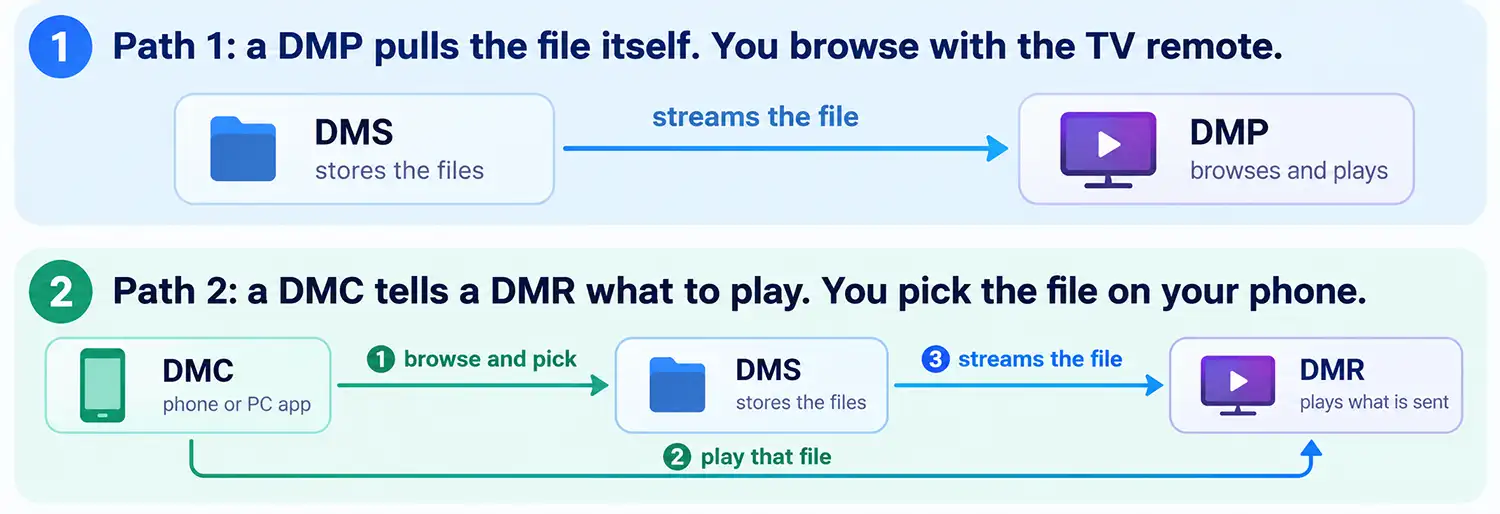
On path 1 the player fetches the file from the server itself. On path 2 the phone only picks the file and tells the TV where to find it, and the TV then streams it from the server.
Path 1, the TV picks the file
Your NAS or computer holds the films and acts as the DMS. When you open the media source on the TV with its own remote, the TV finds the server on the network and shows its folders on screen. You pick a film, the TV asks the server for it and plays it, so the file travels straight from the server to the TV. Here the TV works as a DMP, because it both chooses and plays the content.
Path 2, the phone controls and the TV plays
In this case an app on your phone acts as the DMC. It asks the server for its list of files and you pick a film on the phone. The app then tells the TV, which works as a DMR, where to find that file. The TV downloads and plays it from the server itself, while the phone only sends commands such as play, pause and volume. The video does not pass through the phone.
In short, the DMS stores, the DMP and DMR play, and the DMC directs. The difference between a DMP and a DMR is who picks the file, the TV itself or another device.
DLNA DMS (Digital Media Server)
A DMS stores media files and makes them available to other devices on the network. It plays nothing itself: it answers requests from players and controllers.
Common DMS examples are a Windows PC with media streaming turned on, a NAS drive with a built-in media server, and a computer running server software such as Plex Media Server or Serviio. For a DMS to work, it must be switched on, share the folders you want, and sit on the same network as the device that will play the files.
DLNA DMP (Digital Media Player)
A DMP finds a DMS on the network, shows its folders and plays the file you choose on its own screen or speakers. You control it with its own remote and menu, and it stores nothing.
Smart TVs, AV receivers, game consoles and media player boxes are typical DMPs. If your TV lists a media server in its source or media menu, it is working as a DMP.
DLNA DMR (Digital Media Renderer)
A DMR plays content that another device, the DMC, tells it to play. It has no interface for browsing a server: you pick the file on your phone or PC and send it to the DMR. This is the mechanism behind “Cast to device” style options in Windows and in many DLNA controller apps.
A DMR is not a more advanced DMP. It is the simpler role: a screen or speaker that does what it is told. TVs, network speakers, AV receivers and projectors are typical DMRs.
DLNA DMC (Digital Media Controller)
A DMC finds content on a DMS and sends it to a DMR. It neither stores nor plays the media, it only directs the other two. The usual DMC is an app on a phone or tablet.
DLNA also defines mobile versions of these roles (M-DMS, M-DMP and M-DMC) for handheld devices, and a Digital Media Printer (DMPr) class for printing photos from the home network.
DLNA Today
DLNA is a mature technology that is no longer actively developed. On January 5, 2017, the DLNA organization announced that it had fulfilled its mission and would be dissolved. Responsibility for the certification program was transferred to SpireSpark International, which continues to offer certification services. Although DLNA is no longer evolving, millions of compatible devices remain in use, so the technology is still useful for sharing media on a home network.
Windows 11 includes media streaming features that allow a PC to act as a DLNA media server. Samsung also continues to document DLNA streaming from computers to its TVs, including in support information updated in January 2026. Many NAS devices and media server applications support DLNA as well, allowing you to play personal videos, music, and photos on a compatible TV without copying files to a USB drive.
DLNA is designed for sharing media over a local network, not for accessing streaming services such as Netflix or YouTube. It also lacks modern transport encryption, so it is best used on a trusted home network. Compatibility depends on the TV and its supported file formats, codecs, and containers. Some files may require conversion before they can be played.