When buying a new laptop, monitor, or TV, you naturally want the device to perform well and be easy to use. One of the most important factors influencing your experience is the screen. In this article, I will explain what really matters when evaluating display quality.
There are two main ways to assess a screen: by looking at the technical specifications online or by checking the device in person at a store.
Technical specifications of TN, VA, IPS, and OLED displays
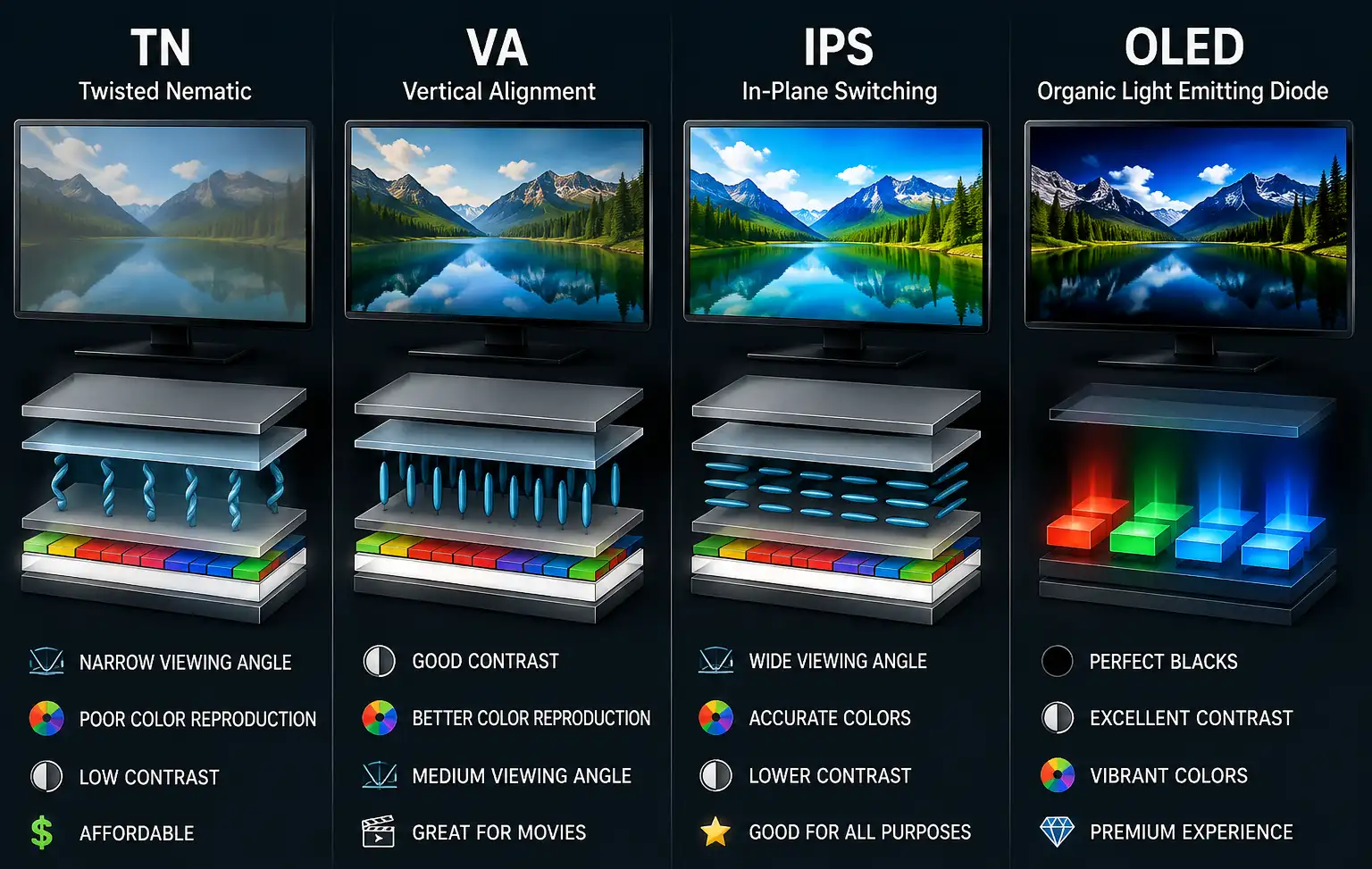
The first thing to check is the display technology. Modern screens are mainly based on LCD or OLED technology. OLED displays are more advanced in terms of contrast because each pixel produces its own light and can be switched off completely. This allows OLED screens to produce true blacks and very high contrast.
LCD displays use a separate backlight, and their image quality depends partly on the type of panel. TN panels are inexpensive but have limited viewing angles and generally weaker color reproduction. VA panels provide higher contrast and deeper blacks, while IPS panels offer wide viewing angles and generally good color reproduction. Conventional IPS panels usually cannot produce blacks as deep as VA or OLED displays.
QLED is an LCD technology that uses a quantum-dot layer to improve color reproduction and brightness. QLED displays can use VA or IPS panels, so the QLED name alone does not determine the overall image quality.
Color depth is another important specification. An 8-bit display can reproduce about 16.7 million color combinations, while a true 10-bit display can reproduce about 1.07 billion. The greater number of gradations allows 10-bit displays to produce smoother color transitions and reduces visible banding, especially in HDR content. Some displays use 8-bit + FRC to simulate additional shades, but native 10-bit provides the full range of 10-bit gradations.
The refresh rate affects how smoothly motion appears on the screen. Basic displays commonly operate at 60 Hz, while 100 or 120 Hz provides noticeably smoother motion. Gaming monitors may offer 144 Hz, 165 Hz, 240 Hz, or higher. However, refresh rate should be considered together with response time because a high refresh rate alone does not guarantee clear motion.
Brightness, contrast, and resolution are also important when evaluating a display. Higher brightness makes the screen easier to see in a brightly lit room, while contrast determines how well it reproduces differences between bright and dark areas. Resolution affects image detail, but screen size and pixel density should also be considered.
In-store evaluation
If you have the opportunity to see the screen in person, start by looking at it directly and then from different angles. Check whether brightness, contrast, or colors change noticeably when you move to the side or change your viewing position. This is particularly important for TVs and laptops, which are often viewed from different angles.
Next, look at a dark image or scene and check the black level and screen uniformity. On an LCD display, pay attention to the corners and edges for excessive light or uneven backlighting. OLED displays should produce very deep blacks because their pixels can switch off completely.
Check the colors using familiar images, especially faces, landscapes, and skies. A good display should produce natural colors rather than simply making everything brighter and more saturated. A smooth gradient is also useful for checking whether the screen shows visible color banding.
For monitors and TVs, watch fast-moving content to evaluate motion clarity. Look for blur or trails around moving objects and compare displays with different refresh rates if possible.
The best way to assess display quality is to compare several similar devices side by side using the same content. Store demonstrations often use bright, high-quality videos designed to make displays look impressive, so they should not be the only basis for your decision. A direct comparison of brightness, contrast, colors, black levels, sharpness, viewing angles, and motion will give you a much better idea of the actual quality of the screen.